
M4b and MP3 are both file extensions used for audio files. M4b being proprietary format, it has limited support for third party apps, that’s when you might need to convert m4b to mp3.
Convert M4B to MP3 Using VLC [Easy Method]
Not only you can play tons of video and audio file formats on VLC media player including Bluray disk (using AACS library) but it also offers the handy option of conversion which is what we will be using to convert m4b to mp3 format. Do keep this in mind, by using VLC media player to convert m4b to mp3 you will lose the ability to preserver chapters.
- Open VLC Player.
- Move cursor to Media tab and click on Convert/Save or you can simply press Ctrl+R keyboard shortcut.
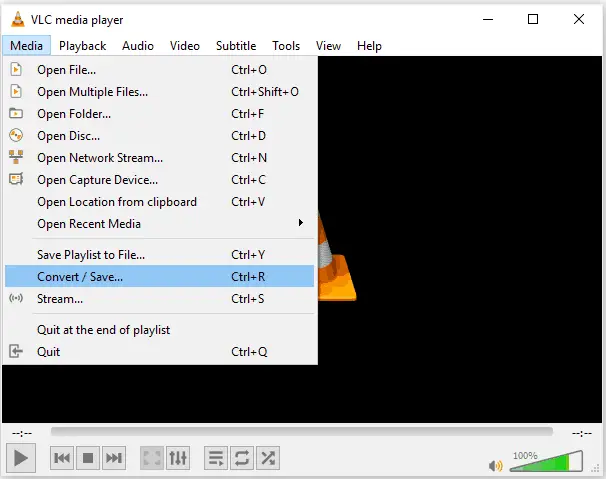
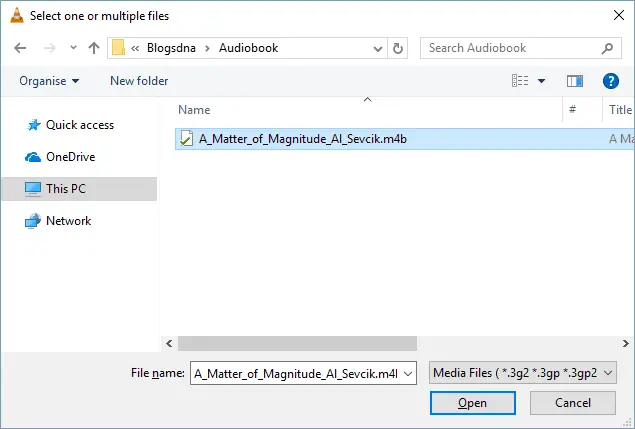
- Click on Add button and select m4b file there.
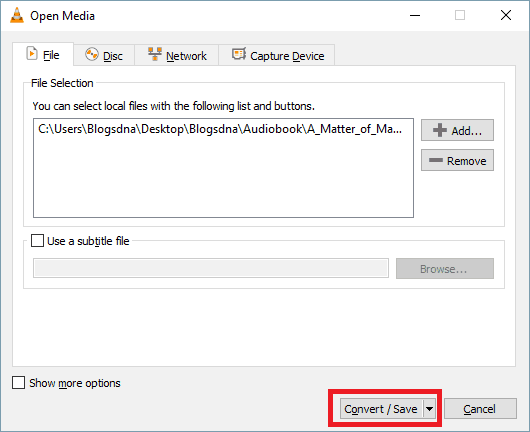
- Click on the Convert/Save button.
- Now select mp3 in dropdown given for profile and choose the destination where you want to save the converted file.
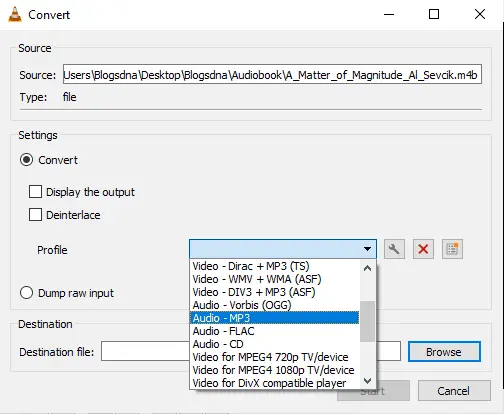
- Click on start and the file will be saved automatically.
if you do not have VLC or looking for different method to convert m4b to mp3 on Windows then read below to know about other offline and online methods of audiobook conversion.
What is M4B file format?
M4b is a file extension which is used to store audiobooks. When you download an audio file from Apple iTunes store then the audio files are stored with a .m4b extension and these files are copyright protected. A .m4g file is created and compressed with AAC encoding based on the MPEG-4 file format. It can run on audio players like iTunes and iPod.
You can not play these audio files on any unauthorized system or device. Once you purchased an audiobook on your iTunes account, you would not be able to access your account in more than five systems. These preventions come under Apple’s FairPlay DRM (Digital Rights Management) technology.
M4b is more popular than m4a audio format because it has chapter marking system which is not available on m4a. It remembers the last spot where you left your music.
What is MP4 file format?
Mp3 is also a file extension that uses the MPEG-1 standards to compress the files. This format is generally used to encode video and audio data with support for more audio channels and increased bit-rates. It is a format made to store digital audio.
Mp3 utilizes strong compression technique utilizing MPEG standard which makes the file size very less as compared to any other format. It keeps the audio quality very fine even after a reduced size. This is the reason, it is the most popular audio format in digital audio.
Why do you need to convert?
If you have m4b audiobooks which you have downloaded from iTunes. You can run them on iTunes or iPad easily but finding alternate players for this format is not an easy task. There are very fewer players which can run .m4b formats efficiently.
On the other side, mp3 is the most popular and common audio extension which can run on most of the players and devices available these days. So, it would be good to convert the file into mp3 which is more accessible and playable in our mobile devices, laptop, pc.
Convert .m4b to .mp3 file Online
-
.m4b to .mp3 converter by WonderShare
This online tool known as WonderShare video converter ultimate can convert many types of audio and video formats to others. Fortunately, this tool also able to convert m4b files into mp3 very effectively. You can convert it with the free tool provided in their website or download the dedicated application for conversion of different files. See the screenshots below to understand the whole process.
- Open the website media.io and select the .m4b file by clicking Add your files
- Select the desired dropdown below (as shown in the screenshot) and click on convert.
Wondershare video converter ultimate Desktop Application (Offline)
There is software available also by Wondershare. It comes in trial and paid version. You can also download this and use it for any types of conversions including m4b to mp3.
-
APowerSoft Video and Audio Converter
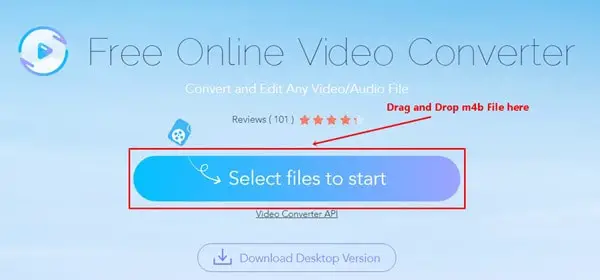
It is another wonderful tool available in online and offline modes for windows and Mac iOS. It can convert many file formats including videos and audio. You can use its online audio convert if you’re on the go and dont want to download any tools for converting m4b to m3. It has an online audio converter on its official website.
- When you reached the homepage. Click on the Select files to start option. (Download launcher file if prompted)
- Select the file and choose the output extension as shown in the screenshot.
Apowersoft Video Converter Studio (Offline)
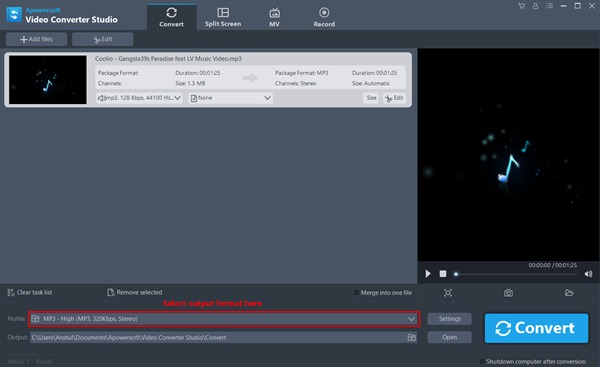
You can download the Video Converter Software on your pc if you want to convert a large number of files or you are looking for an all in one conversion package. It can convert video formats too.
-
The cloudconvert online conversion tool
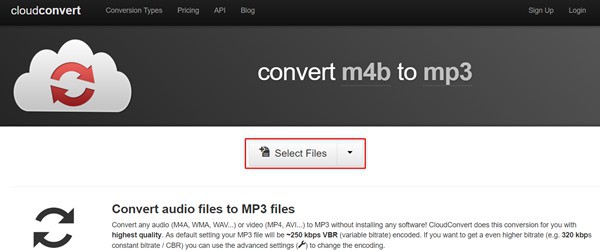
This is a website which can convert your m4b file into an mp3 file instantly. This is a free tool and it can be opened by simply going to this link(https://cloudconvert.com/m4b-to-mp3)
- After going to this link, Click on select files option on the homepage.
- Select the m4b file and select the output extension at mp3.
- Click on convert and download the converted mp3 file.
Offline Methods to Convert m4b into mp3
There are some applications which can do this conversion without an internet connection if you install them on your pc. Below are the offline tools and working process of converting m4b to mp3.
-
Convert m4b to mp3 with iTunes
You might be not aware of this feature of iTunes but it is also capable of converting the formats of audio files. To do it, follow the procedure given below:
- Launch iTunes
- Open the file with iTunes to convert it. You can drag and drop the desired file.
- On the top of the window, click on Edit and Select Import Settings under Preferences.
- A new window of Import Settings will be opened
- Select MP3 encoder in the dropdown given for Import using option and click on OK.
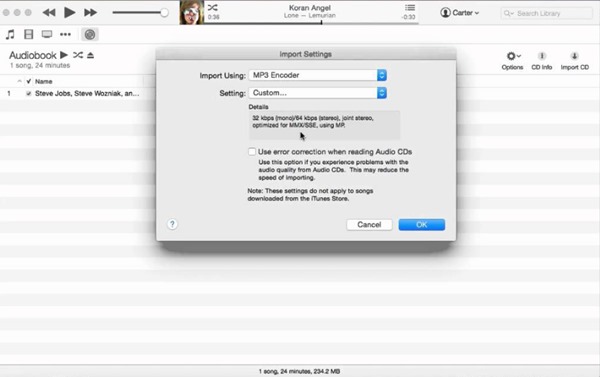
- Now, select the file which you have copied to iTunes earlier
- When the page is opened with your desired audio file, click on File>Convert>Create MP3 version.
that’s it, wait for the iTunes to complete the conversion and your mp3 file will be ready.
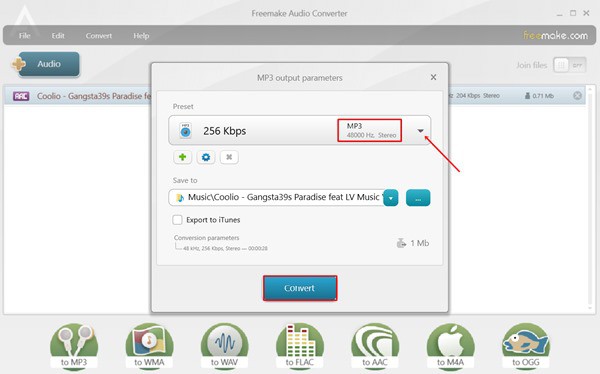
This is another offline and free tool which can convert multiple audio extensions to others. It is available officially on its website. This could be a useful tool to convert an m4b audio file into mp3.
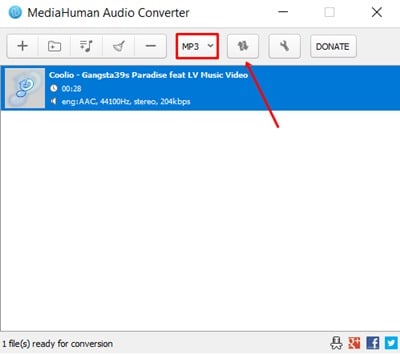
It is a simple audio converter with some advanced option. It converts files perfectly into many customizable output formats. It can import converted songs into iTunes with its auto-import option.
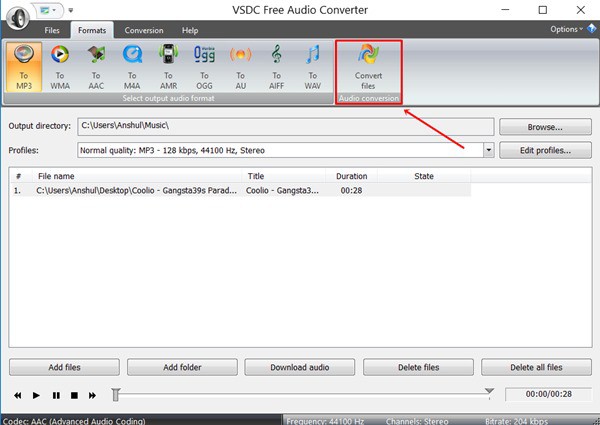
This software supports all popular audio file formats and can convert into many others. It is a quick and reliable converter with a feature of drag and drop.
Wrapping up
We hope by now you have got the idea on how to convert audiobook (m4b) to mp3. VLC is the best method to go for as its available for almost every platform. The another similar tool is FFmpeg, a command line program which offers tons of many other feature. The only downside is it doesn’t have any GUI and you have to do it via commands. If you are using public PC then online services can be better to go after for your m4b to mp3 conversion need.


