

Microsoft’s DirectX is a free API (Application Programming Interface) that gives multimedia applications the power to work on Windows-based computers. Games that run in the Windows operating system rely on DirectX because it provides an assortment of drivers and tools that are designed to optimize the game’s use of the available peripherals in the target computer. For example, when a user plugs in a joystick that normally needs drivers to run, DirectX has a generic driver that the joystick can be used so you can enjoy your favorite games with the desired game controller too.
Direct3D 11 is out and ready for use by your game today to exploit the latest in video hardware features as well as the current generation machines. Microsoft has been continuously evolving DirectX to implement latest graphics technology features and to support wide varieties of games, Display devices. After making DirectX 10 available for Windows Vista here is the next version DirectX 11 with Direct3D 11. The new version of DirectX, the software behind the eye-popping 3-D visuals and immersive sound effects found in many of today’s PC games.
DirectX 11 is part of DirectX SDK and contains Technical Preview of Direct2D, DirectWrite, DXGI 1.1. Good news is,DirectX 11 End-User Runtimes is already available for download today.
DirectX 11 features include:
- It’s designed to be more efficient, leverage the power of today’s multicore processors.
- It’s providing support for sophisticated shading and texturing techniques such as tessellation.
- Results smoother 3-D animation, and graphics more lifelike and nuanced than ever before.
DirectX 11 Updates include:
- High Quality HDR Post Processing.
- Improved Tone Mapping.
- Parallax Occlusion Mapping.
- Improved Water Rendering.
- Real-Time Local Reflections.
- Contact Shadows (SSDO).
- New Advanced Graphics Options.
- Realistic Shadows with Variable Penumbra.
- Improved Multi-GPU Support.
- Particle Motion Blur and Shadows.
Windows 7/Direct3D 11 Technical Preview is part of DirectX SDK and contains Technical Preview of Direct2D, DirectWrite, DXGI 1.1. Good news is, it is not only available as Technical Preview but also as DirectX End-User Runtimes.
DirectX 9 vs. DirectX 11
The biggest difference between DirectX 9 and DirectX 11 is the illumination. Due to HDAO and nice Post Effects, the visual appearance of Dirt 2 with DirectX 11 is less “over bright” and smoother. The more realistic look of the DirectX 11 version might convince some players since there have already been mods for Race Driver Grid that were reducing exactly those warm colors and thus created a more realistic appearance.
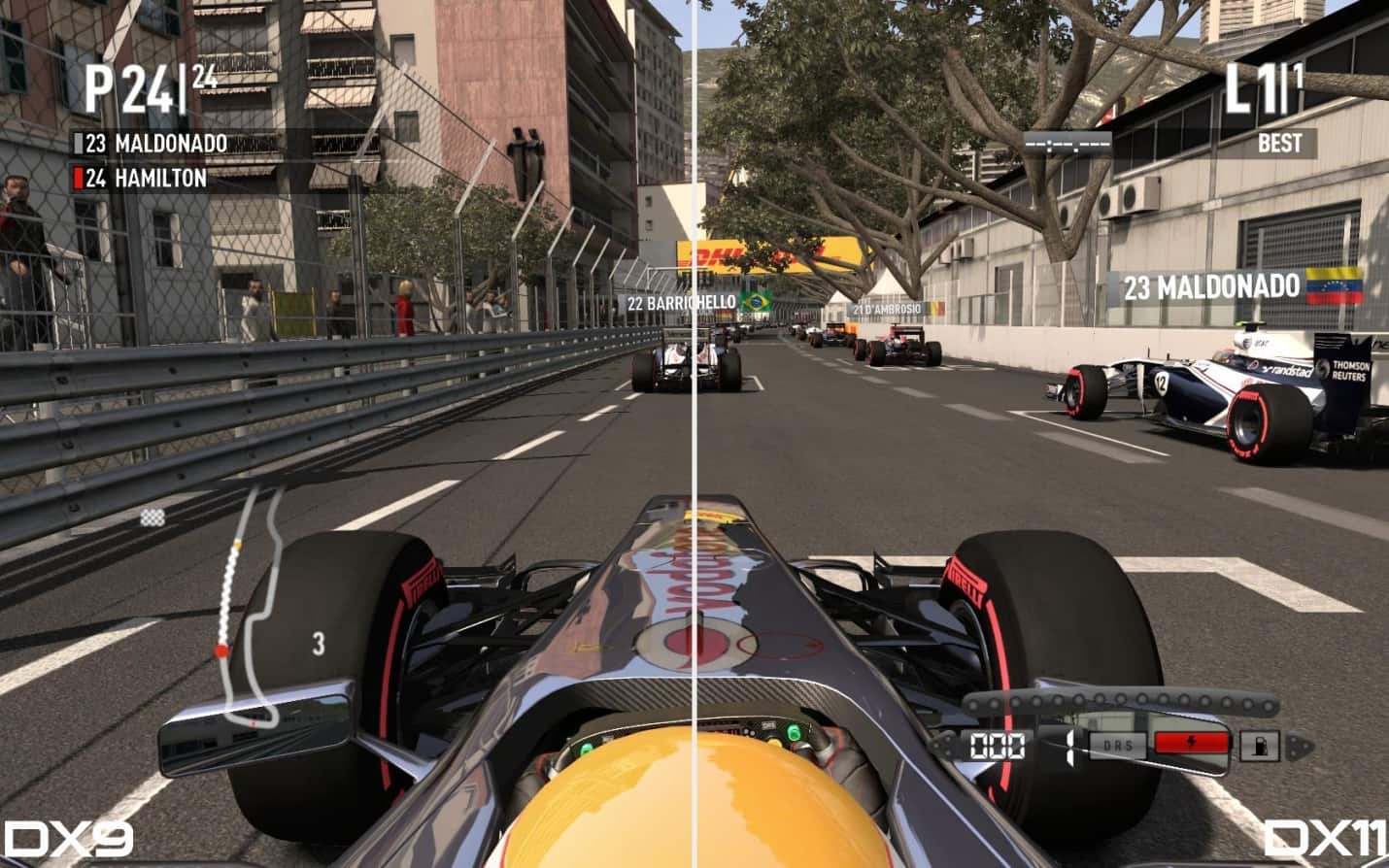
(Click on Image to enlarge)
However, Direct3D 11 (DirectX 11) only supports Windows 10, Windows 8.1, Windows 7 and Windows Vista only. Windows XP users cannot install DirectX 11.
How to Download and Install DirectX 12, 11, 10, 9
By default, all latest version of Windows operating system comes with built-in latest DirectX installed, ideally, you shouldn’t need to install it but in case you are having an issue with your Windows graphics and you wish to troubleshoot by reinstalling DirectX 11 then here are steps on how to install it.
1. Go to Microsoft’s DirectX End-user Runtime Web Installer page.
2. Select language and click on Download button, do make sure to uncheck the additional software that Microsoft may recommend you to install.
3. Click on No thanks and continue button, and it will prompt you to save a setup file of size 286KB. Do not worry, this is not the complete installer.
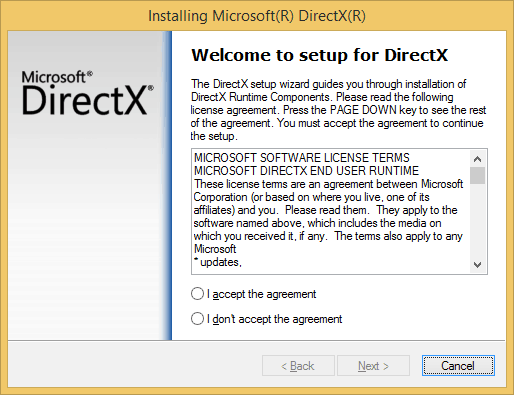
4. Once you download the web installer, click on dxwebsetup.exe and accept the agreement, proceed to click on next button.
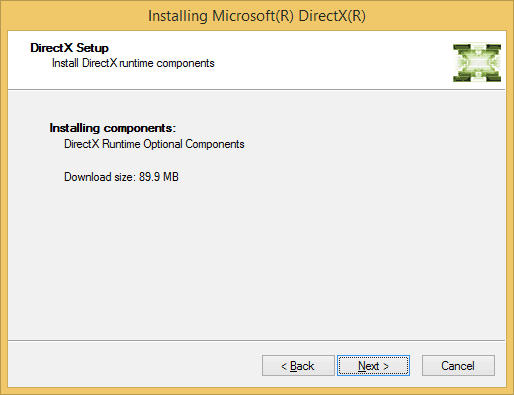
5. Now the websetup will display the DirectX Runtime Optional Components with a download size of 90MB. Click on Next and wait for the installer to finish downloading and install.
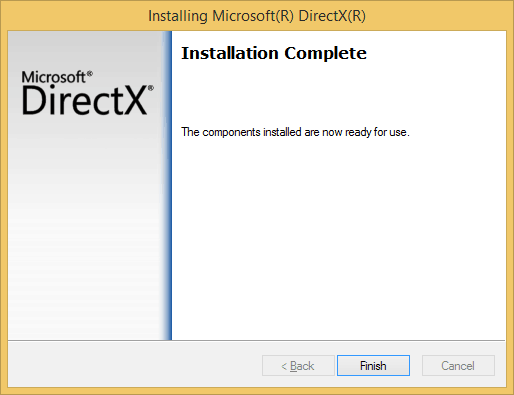
6. The setup will display the installation complete. Please make sure to restart your Windows for changes to take effect.
Download Windows 7/Direct3D 11 (DirectX 11)
Download DirectX 11 Software Development Kit
Download Windows 7/Direct3D 11 (DirectX 11) (SDK)
Download Windows 7/Direct3D 11 (DirectX 11) (Web Installer)
Free Download DirectX 11 Standalone Installer For Windows XP User (DirextX_11_Setup/DXSETUP.exe)
To find out which graphics cards are compatible with DirectX 11, go to the Windows 7 Compatibility Center website.
If you like this article then do consider hitting +1 button and other Social sharing options.



99 thoughts on “Download Windows 7/Direct3D 11 (DirectX 11)”
thank you
thanx 4 the Dx11 DL :)
64
thank
THANKS
which one to download? SDK or Web Installer?
is it sdk or web installer
for microsoft
i am using it
thank you
yahooooooooooo
b?dzie dzia?a? z codem black pos
i love you man thanks!
thanks
thxxxxxxx
Sdk would be better
***THANKS***??*** ????? ***
Excellent, thanks :)
Essa porra demora -‘
thask you
thank
thank
thnks…
thanks
THX
thx
thx
tHx U cup
its fantastic
this is good,.tnx
its good,but full virsion is very good.
thnx
thx
thanks a lot
Thanks a lot
OH COMMON YOU CANT EVEN GIVE DIRECT X 3d
thanks
thank you
Thanks!
theeeeeeeeeeeeeee
???????, ?????? =)
??? WTF SDK OR WEB
HHHH
thank very very
thanks very very
thank you so much
fuk you
fak
my graphics card mobile Intel (R) 4 series express chipset does not support direct x 11. I need it for my 3d project
test
hmmm ty man
is it free?
My anti-virus says it maybe has risk for virus? :(
Whats better .. SDK or Web Installer??
This is the error I get when I install directx 11 web installer:
“A cabinet file necessary for installation cannot be trusted. Please Verify the cryptographic services are enabled and the cabinet file certificate is valid.”
Can anyone please help me…
If possible, mail to me at gokulnc @ymail:twitter .com Thanks in advance
one of my games says it needs directX3d.. but now that I’ve installed it when I start up the game it says could not load directx3d… any1 has some advice on that?
yup
thanks
thx
Thank
7889
mappakoeeee (Y)
JALWA HAI
do i need to download the 2 ?
obrigado viadoes pelo directx 9 seus fdp
wow i got it atlast
Is this free?
is this the full version
??? ???????, ?????
nice and yes
my computer if i want to got one game i see one error how i can clean that eror to i can play games.i cant play anyovane games now
Muito Bom! Mesmo esse DirectX 3D SDK
Fale APena Baixar Melhorar Muito o Jogo Bastante!!!
Thank you very much.
I want it to let Hitman Absolution work which one?
I am can’t downloading file!!!
? ?? ???? ??????? ????
IS THIS WILL WORK WITH VISTA
u can download Wed installer .. it’s easy to install for your computer ..
thanks
????
kkkkkkkkkkkkkkkkkkk
it does not work on my nfsmw 2012 someone help me pleaseeeeeeeeeee
web installer is better
Thank for this aplications
Tkx
What Difference Between Sdk And Web Installer Sdk Is 571 Mb And Web Installer Is 35 Mb I thing web installer is batter than Sdk Dear Helper!
which one to download dota 2 custom ?
i want to play hitman 3
Thanks
how to download??
????????? ??????
Try Again.
???????? ??? ???.
Yes with Vista With 7 With 8 & 10.
What is it? No.
Just Click on the links that says ”Download Windows 7/Direct3D 11 (DirectX 11) (SDK)”.
Download Windows 7/Direct3D 11 (DirectX 11) (SDK)
Then in that case Download the Web Installer of it.
With it will work on everything all its same thing actually!.
SDK the middle one in the line.
what should i download because i want to play men of war AS 2
Cool Games.
yeah same here