
Most of the users prefer to use Gmail for their business communication. You can configure Outlook on windows to work with Gmail. Unfortunately if you add or remove contacts from Gmail web interface you need to also update outlook contact/address book manually.
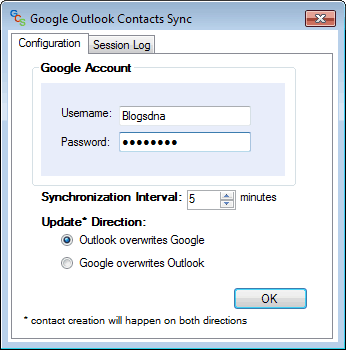
To get rid of this manually contact synchronization task here is an excellent utility Gcontactsynch aka Google Contacts Outlook Synchronizer. This utility provides synchronization of Outlook contacts to and from GMail/GMail for applications accounts (even Standard Edition).
Google Contacts Outlook Synchronizer
System Requirements
1. Outlook 2007
2. Windows XP+
3. .NET Framework Runtime 3.5
Download gcontactsynch (Google Contacts Outlook Syncrhonizer).


11 thoughts on “Sync Gmail Contacts with Outlook using Google Contacts Outlook Synchronizer”
Outlook 2010? any release coming?
Every time I open the program an error message pops up and closes the program instantly. I give this a poop rating – not usable.
I would love to make it work, since I got the Motorola with androi, my contacs are de-syncronyzed…
Unfortunatelly I got the following message while trying to sync:
Error: Interface not registered (Exception from HRESULT: 0x80040155)
anyone can help with it?
hi there, it works like a charm (win7, outlook 2007, german) but i have one question: i have 2 outlook profiles, i only want one to be synced. when i start the program, i can choose the profile and everything works. what happens, when your programm is started and i change profile? does it start to sync the (wrong) account, do i have to quit the sync programm before changing outook profile?
thank you for your answer
Doesn’t work. (Win XP, outlook 2007)
test
can i sync outlook contact folders with gmail contact folders?
Nice small program. Does its job well and fast. Only thing is that there is no transition of the groups-name. I am satisfied.