
Android phones offer great features in a lower price tag, but the interface will not suit everyone. Especially for our parents and grandparents, the options and the interface are pretty difficult to understand. Launchers are biggest boon for Android devices. They are capable of completely changing the look and feel of the device. Unlike themes and customizing options available for other mobile operating systems, Android launchers are easily customizable and you can switch between the launcher and original theme very smoothly. Previously, I wrote about best launchers for Android devices. Today, I’ve come with a new set of simple launchers for Elder people to easily understand the options. The list is as follows
Wiser Launcher
Wiser is one of the simple launchers I’ve ever used on my Android device. The app will completely redesign your interface and there will be only six important options available on the home screen with larger icons. All the important contacts and apps can be added to “Favorites” section on the home screen for quick access. The contacts and apps added in Favorites section can be easily accessed with just a swipe. Another important feature in the app is, it will simplify the default notifications. You won’t get notifications for everything, only important notifications will be displayed in a clean interface. You can read the full review of this application here.
Simple Senior Phone
The Simple Senior Phone will make everything easier on your Android device. Default features like home screen simplification, large icons, important contacts on the front, etc., are made automatically after you install the application. The launcher will not use the default notifications, it will be simplified with bigger fonts and different colors to quickly read and identify them. This app will be very helpful for seniors and people who have bad eyesight. Also, it has an inbuilt option to block annoying users and default apps on the device.
Necta Launcher
Necta Launcher is a must have application for senior people. It makes all the options easier and bigger on their Android Smartphone. The apps will not be confusing, only necessary apps like Phone, SMS, location, etc., will be available on the home screen and the font size will be extra large for all the installed apps. So, people with poor eyesight can easily read and identify it. An important feature of this application is, users can send their current location to favorite contacts by using “Position” and “SOS” app on the home screen.
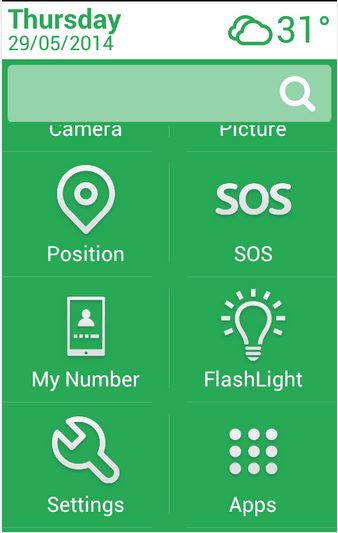
Big Launcher
Big Launcher is yet another simple launcher for Android. Similar to other launchers discussed above, it will magnify everything on your Smartphones and Tablets. The custom designed interface, will bring all the important apps, contacts and emergency buttons (SOS) to the home screen. Dialers, messages and all the default interface will be revamped to large and clear view for easy reading. The app has both free and premium versions. The free version has limitations in sending messages and customizing the interface.
Large Launcher Senior Phone
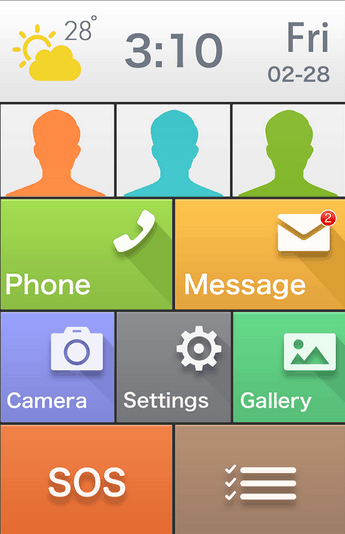
Unlike the complicated default interface, Large Launcher will make the default options simple and easy to use for seniors. There will be only two things they have to do, either slide up/down or tap the apps to open. Similar to other launchers for seniors, all the icons and fonts will be made larger, simplified notifications, SOS for sending current location and much more features are available. Compared to other launchers, this app has a beautiful home screen and organize all the important apps automatically as shown in the screenshot below.
If I’ve missed any of your favorite launchers for elderly people, please let me know in the comments. Thanks for reading, do share this post with your friends.



4 thoughts on “5 Best Simple Android Launchers For Seniors”
Hello,
I think it’s time to revisit this topic as it appears that none of these are available or working.
Does it also work on a tablet??
Most apps also has tablet specific versions so ideally it should work.
These are all great resources! Have you heard of ONY Phone by SilverActivities though? They have a really clean launcher with lots of extra features – plus it’s reasonable, and easy to navigate. Arguably it’s prettier than a lot of the existing launchers as well, a lot less clunky looking!