
There are number of free applications available which lets you to burn ISO image or make audio or video CD/DVD. However most of those tools are resource hogging as well as big in size. If you are looking for utility small in size and does the job of burning ISO file to CD/DVD or USB flash drive then here is ISO2Disc.
ISO2Disc is simple ISO burner software to burn your ISO image file to CD/DVD disc or USB flash drive. It can support CD-R, DVD-R, DVD+R, CD-RW, DVD-RW, DL DVD+RW, HD DVD, Blu-ray Disc and USB flash drive. It’s the best and most essential free software for creating bootable CD/DVD or USB flash drive from ISO image file.
To burn ISO file simply download & install ISO2Disc. Now Click the Browse button to select your desired ISO image file. Select the target device (CD, DVD or USB flash drive) from the drop-down list. Click the Start Burn button to start the burning process.
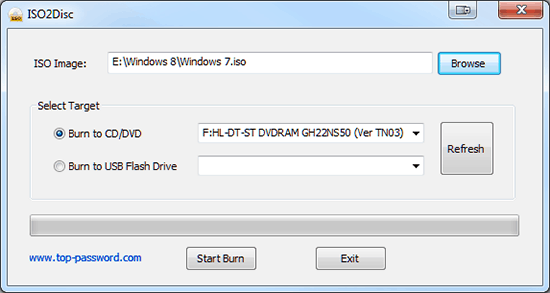
ISO2Disc supports Windows 7/2008/Vista/XP/2000/2003 and takes less than 2MB os hard disk space.



5 thoughts on “Burn ISO Images to CD/DVD or USB Flash Drive with ISO2Disc”
sounds nice, but can this be used to add an XP iso file to a usb? i’ve tried many software before. none worked, or ended in errors
ISO2Disc supports bootable ISO image of BartPE, Windows 8 and 7 operating system only.
Since the version 1.08, ISO2Disc also supports Linux ISO image as well.