

Windows 7 has better access control then vista and XP and with user account control all the process are launched in protected mode even if you logged in as administrator. In case if you have installed windows 7 on another computer present in your network then only way to access it from your own machine is using remote desktop.
But if some one already logged on windows 7 then you wont be able to login as windows 7 by default doesn’t allow concurrent sessions. If you try to login to windows 7 while another users is already logged in locally or remotely then a message will be displayed as show in below screenshot.
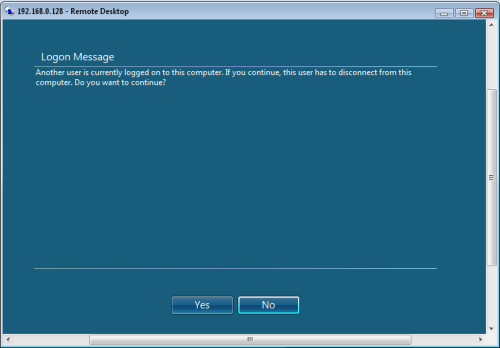
Only one user can login to windows 7. Well don’t worry some one has already found the way to allow multiple user login to windows 7 i.e Concurrent User Sessions. Here is guide to enable concurrent user sessions on Windows 7.
How to Enable Concurrent Users Sessions on Windows 7
1. Download this Concurrent sessions enabler.zip
2. Extract the files from above downloaded zip file
3. Shift+ Right Click on install.cmd file and select run as administrator.
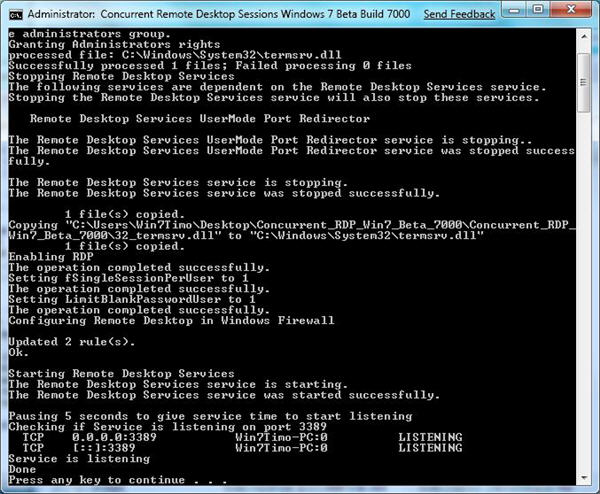
4. That’s it. You should see below screen after you have executed install.cmd



37 thoughts on “Enable Multiple User Access/Concurrent User Sessions For Remote Desktop on Windows 7”
This only works with the 7000 build.
Is it any posibilities to make it work on build 7022?
There is a 7022 hack here: http://www.winmatrix.com/forums/index.php?showtopic=22479
I am actually looking for one that will work on the latest build 7048 (x64 or x86 I do not care which one)
Is there a general instructions page to hack the termsrv.dll file?
MS really needs to enable concurrent sessions natively!
Thanks GAVJC
I’d already found it several days ago, and forgot about this thread.
I’m also looking for the 7048 version.
And if possibly an how-to hack termsrv.dll
Yeah… they came out with the 7022 version within days of the release, i wonder why they arent doing the same with the 7048. Someone obviously knows how to hack these files, i just wish that there was a general how-to like yorself
Any news about a hack for build 7057 ?
Has anyone seen this patch for 7048 or 7057??
when I have time, I am tempted to look into the hex code for the original and hacked 7022 termsrv.dll files and see if I can make any headway myself into this. I think I would probably mess things up more than fix em, and the RC is going to officially be released any day now so it doesn’t really matter if I can have a concurrent sessions hack working for a month. I will just stick to 7022 until either someone comes out with a new one.
A hack for windows 7 build 7057 x86 can be found here:
http://www.winmatrix.com/forums/index.php?showtopic=22479
But now that build 7068 is the newest compilation, this is more or less old news. hehe
I’d love to see this for Win7 RTM now that it’s out.
Yeah a hack for the RTM dlls would be lovely…
I followed the instructions in Gavjc’s link and it worked beautifully for Windows 7 RTM 64-bit.
Just hex edit your current termsrv.dll file as described in the above link and use install.cmd to install it. (You’ll have to modify install.cmd to ignore the OS version checks.)
Very cool!
Concur with Robbo. Just followed the same instructions for x86 and it worked fine!
A guide for Windows 7 RTM can be found here:
https://www.blogsdna.com/4560/how-to-enable-concurrent-sessions-for-remote-desktop-in-windows-7-rtm.htm
Has anybody seen a version of this dll for Windows 7 Enterprise (x64) yet?
Windows 7 Enterprise (Server 2008) already has this feature. It’s called terminal services; just enable it.
If you’re referring to Windows 7 Ultimate x64, then look at the links above.
MANDG: fyi, there is a version called “Windows 7 Enterprise” and that is NOT “Windows Server 2008 R2”.
Zip file download is dead link…?
Awesome hack, been using it with Yoics to remotely access our home machine without having to worry about kicking my wife off.
Any update on this? Not supported by Windows 7 SP1 (RTM), so it’s quickly losing validity… any tips on how to patch it manually? I really hate dropping generic-boxed-versions of files into my system, much rather patch it myself… :/
Does anyone have tested this with the Win7 SP1?
Thanks!
I would so love to have a fix for this for Windows 7 SP1…..
didn`t work!
totally stoped all remote desktop conetions…. 4 me cant even use 1
If you logon then Lock the computer another user can logon and you are still logged on.
Works great for me testing my Power User versus my Admin login.
I changed the first 3 lines in the script as follows and it seems to be working ok for me….
SET WINVER=Windows 7 Build 7601
SET PRODUCTNAME=”Windows 7 Enterprise”
SET CURRENTBUILD=”7601″
this broke my RDP, too!!!! how do i fix it? horrible script.
i installed tightvnc server and seemed to get my RDP back… MS RDP. oye!
copy this file from another machine %SystemRoot%System32termsrv.dll
this should fix your problem
I’ve never seen the message shown above whenever I connected to a RDP session on a WIn 7 machines, even when another user is logged on, it just closes the previous session and automatically logs in with the new user
@google-be19d734a8cc45b660f672bccf8385cb:disqus nope didn’t at least for me
nope didn’t at least for me
The download link Broken !!!
Please fix that :)
The download-link is broken. 404 Not found.
reupload
I have windows7 professional and I patched termsrv.dll, but after then RDP client trying to connect with remote PC and in same time automatically disconnecting. Could you please help: [email protected]
Is this site dead? no updates, links are broken?
Yep, looks like it’s dead…
I just tried to download the file with no luck.