
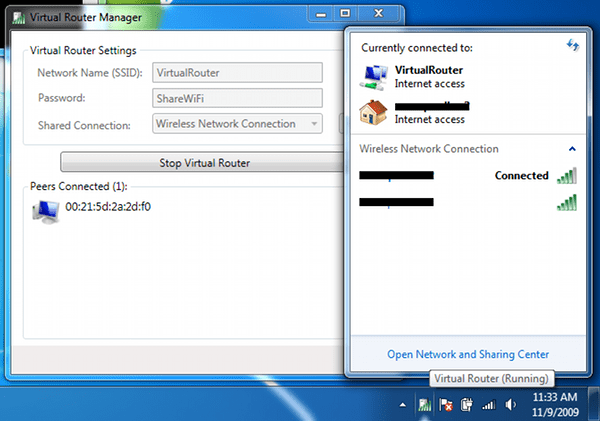
Few days back we had covered guide on how to setup virtual wifi on windows 7 using built-in windows 7 capabilities. If are finding it difficult to follow our guide then here is open source freeware tool Virtual Router which turns any Windows 7 or Windows 2008 R2 Computer into a Wifi Hot Spot using Windows 7’s Wireless Hosted Network (Virtual Wifi) technology.
The Wireless Network create/shared with Virtual Router uses WPA2 Encryption, and there is not way to turn off that encryption. This is actually a feature of the Wireless Hosted Network API’s built into Windows 7 and 2008 R2 to ensure the best security possible.
You can give your “virtual” wireless network any name you want, and also set the password to anything. Just make sure the password is at least 8 characters.
Virtual Router



12 thoughts on “Turn Windows 7 into Wifi Hot Spot with Virtual Router Free Tool”
Great idea, but sadly didn’t work for me. Once loaded, I tried to run it but it came back with “Virtual Router could not be started!” with no further explanation. :(
Hi, It also did not work for me and it always says virtual router could not be started
omg it didn’t work for me D:
Give a try to Connectify ;)
http://www.connectify.me/
“Turn your Windows 7 laptop into a WiFi hotspot to share the Internet with friends, co-workers, and mobile devices.”
Btw, guys, both of these apps do work for my compie but not stable (sometimes Internet disappears). Don’t know why.
I suggest you to use native vendor’s utility (e.g. TP-Link Wireless Utility). If your WiFi adapter supports SoftAP feature, of cource.
http://virtualrouter.codeplex.com/wikipage?title=Supported%20Devices
Another option is http://wlancontroller.com
Okay..What I want to do is something slightly different. Let me know if anyone has come across a solution for this (Software or hardware.) I have a webserver on my linux laptop. What I want to do is (Even if there is no Internet Connection) setup a LAN connection through my laptop wireless infrastructure; I.E. My laptop can access the linux laptop webserver through intra-net IP address without the need for Internet; Also, it’s important to state, I do not want to have any plugged in wireless router. I usually take these two laptops on business trip and I must connect from one laptop to another without relying on an internet connection.
I use a USB dongle for connecting to internet. Yesterday I downloaded and installed Connectify software. It did not work with USB dongle internet, but it worked fine with the WIFI hotspot in my house.
Today I installed the Virtual Router on my laptop, but I am facing the same issue i.e. the USB dongle internet cannot be shared with other devices through my laptop. Any suggestions?
you cannot use ics in windows starter microsoft wants more money