

Facebook Chat History on Facebook.com is only temporary. Indeed, Facebook Chat history can be easily removed by pressing “clear chat history” or by exiting the Facebook chat popup window.
There are, however, two solutions that make it possible for your Facebook Chat history to be automatically or manually saved. You can use a Facebook Messenger such as Chit Chat for Facebook or a browser add-on to save your Facebook Chat History.
Saving Your Facebook Chat History
Facebook Messenger
With a Facebook Messenger, Facebook Chat history can be both automatically and manually saved.
By automatically saving Facebook Chat history you can ensure that you don’t forget to save a conversation that you want. Moreover, Facebook Chat Messengers will time and date stamp your conversations. Additionally, the Facebook Chat history will be saved on your computer as opposed to on Facebook.
Chit Chat for Facebook
Chit Chat for Facebook is a Facebook Instant Messenger that enables you to use Facebook Chat from your desktop.
With regard to Facebook Chat History, Chit Chat for Facebook makes it possible to automatically save all instant messages sent and received on Facebook Chat. Usefully, Chit Chat also provides a date and time stamp in its chat logs. Uniquely, Chit Chat for Facebook not only saves the formatting of messages (bold and italic) it also saves the emoticons used.
The image below provides an indication how the Facebook Chat History stored by Chit Chat for Facebook.
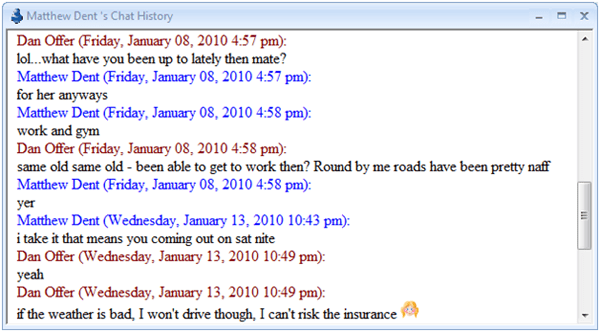
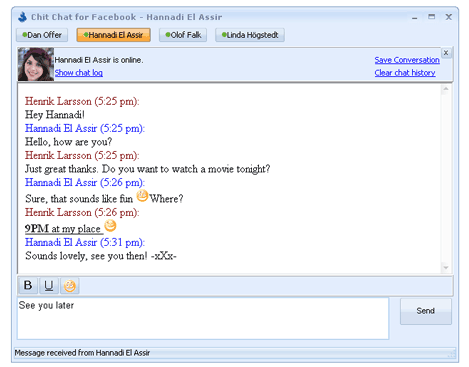
Facebook Chat History of a particular conversation can also be manually saved by clicking on “save conversation.”
Facebook Chat History browser add on
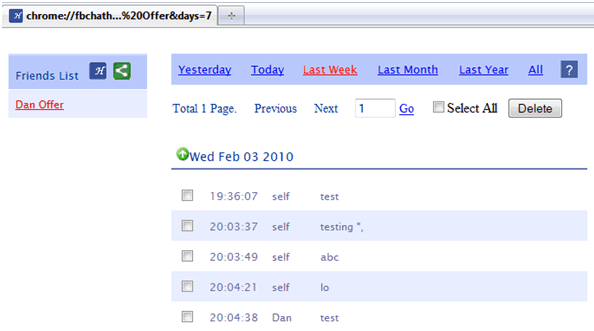
If you’re a Firefox user, then there is a Facebook Chat History browser add-on suitably named “Facebook Chat History” manager. Whilst it’s an experimental build, it did work fine for me. I especially like the way in which it indexes your conversations by person and by time period in a central location. However, I found that to get it working it is much more technical and complicated than using a Facebook Messenger.
I also found it annoying that it uses the current tab window rather than opening a new one – so if you are on Facebook Chat in Firefox and then go to view your Facebook Chat history this application effectively logs you out.
For example, you need to identify Facebook’s ten digit ID number for your Facebook profile page.
This is a guest post by Daniel Offer, one of the architects behind the Facebook Messenger “Chit Chat for Facebook”.


