
There is consistent increase in number of devices having USB support. Almost all type of devices we want to have USB support so that we can easily connect this devices to computer, laptop. Advantage of having USB support is faster data transfer.
Today’s computers have more then 8 USB port so that you connect an many devices as much you want. You may some time wish to find all the devices connect to your computer thru USB. Here is small freeware utility USBDeview which lists all USB devices that are currently connected to your computer.
USBDeview displays Device name/description, device type, serial number also you can remove or disconnect USB devices that are currently connected to your computer.
Screenshots of USBDeview 1.28
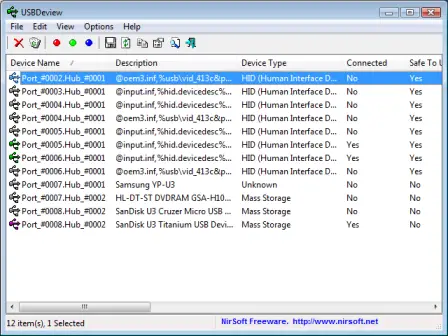
You can use USBDeview on remote computer and there is no need of USBDeview installation just copy USBDeview.exe in any folder and start using it.



4 thoughts on “Find All USB Devices Currently Connected to Your Computer with USBDeview”
this has to be the dumbest thing ever
i know dang well that at this moment, connected to my computer’s USB is: keyboard, mouse, printer, and flash drive with out looking down or using a special program
also btw my computer has only 6 USB ports
the only other things i would connect to my USB ports are my PSP, my camera, and my iPhone all of which i would obviously know if they were connected
there is also a little button on the task bar that does this simple function already, so this is useless
Ryan where is that little button on the task bar? OMG your post is from 7 years ago!! I have stuff plugged in directly to a USB port and it doesn’t show in This PC. I am running Windows 10
Where is that little button on the task bar? OMG your post is from 7 years ago!! I have stuff plugged in directly to a USB port and it doesn’t show in This PC. I am running Windows 10
Sir restore kiy hai oppo A 5 ko USB nhe hata RHA hai sir bat skty hai us ka kiy masla hai