
We have already covered number of tools which allows you to change Windows 7 Logon Screen. However these tools don’t provide any option to change Windows 7 boot animation displayed before logon screen. Here is simple tool Boot BMP Changer with which you can easily change Windows 7 Logon animation & replace with your own static image file.
The Boot BMP Changer application uses two flags that you can add to your boot.ini file to change the Windows loading animation to a static bitmap file.
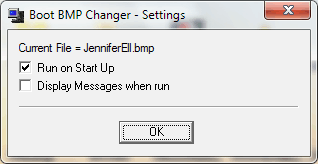
The program can be set to run at start up, and copies a different bitmap to your WINDOWS directory, so that every time you reboot your computer, a different loading screen will be displayed. The bitmaps that can be used must be 640 x 480 pixels and 16 colors only.
Features of Boot BMP Changer
1. Easy to use graphic interface.
2. Audit function checks the bitmaps in the program directory and adds any valid files to the list to be used by the program. Files that are the wrong size or colour depth are reported.
3. Change the current image by scrolling through the currently avaliable images.
4. Run the program silently on on start up.
5. Optional display a message when the screen is changed.
Boot BMP Changer
Boot BMP Changer supports Windows XP, Vista & Windows 7.



11 thoughts on “Change Windows 7, Vista & XP Boot Animation with Boot BMP Changer”
Sandeep, no program can change Windows 7 boot screen. So this program will not work with Windows 7.
I dont know about Sandeep but if this program works my friends are gonna go crazy watching my laptop boot!
intowindows learn to use your pc, you can easily change the windows 7 boot screen several different ways.
doesnt work with windows 7
While installing this BootBMPChanger on Vista I get an error during installation. It says cannot copy C:\boot.ini to C:\oldboot.ini
I guess that’s normal because in an old backup of my C drive I can’t find any C:\boot.ini file either.
This is most confusing because we all know that fooling around with a boot.ini file is dangerous.
Why didn’t you mention this would happen with Vista users installing this BootBMPChanger? There is no boot.ini file in the root of Vista’s C drive !!
Not working for me
it is not possible as of yet to change Win7 BOOT SCREENS. you can however change the LOGIN SCREEN several different ways
you can change your bootup image/animation with the following tools:
http://mystshadow20xx.deviantart.com/#/d35cbow
tried and works for me with Windows 7 Ultimate
VERY VERY BAKWAASSS AND MAD SOFTWARE0
dude u all are mad cmon u can easy change ur boot up screen by win 7 boot updater just google it morons