
Do other people use your computer/laptop? Or maybe at times, some people suddenly interrupt you to use your laptop for a few minutes. In this case, you do not want to lose your current open windows and documents. However, you also do not want the other person from accessing these windows and documents.
WinLock is one such application that allows Windows users to lock and hide their open windows – preventing other users from accessing these windows. In order to access these windows, the user must type in a password. This password is configured in WinLock.
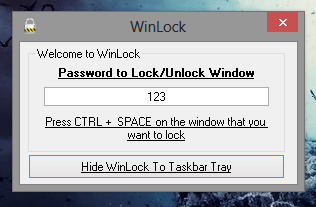
Using the software is pretty easy. Simple. Navigate to the link provided below and download the application on your Windows software. Once the software is downloaded, install the application. Once done, fire up the application and you will see the simple interface of the WinLock software.
All the user needs to do is configure the password and click on the “Hide WInLock to Taskbar Tray” icon. The WinLock icon will disappear into the taskbar. Now, whichever window you want to hide and lock, open it and press “Ctrl + SPACE” and the window will automatically disappear into the taskbar as well. Click on the taskbar and you will see the document/window visible there. Clicking on it will prompt you for a password. Once you enter the password, and it is correct, the session will resume again.
Winlock is a handy windows utility that can protect your privacy and makes sure no one access your opened windows and software. Feel free to share your views if you gave WinLock a try.
Download WinLock


