

In past we had posted hack to enable Multiple users access (Concurrent sessions) for Remote desktop on Windows 7 Beta. For those who don’t know what’s a Concurrent session for Remote Desktop, with remote desktop you can connect to windows computer remotely however in Windows 7 there is restriction and only one user at a time can connect to Windows 7 Computer via remote desktop.
Unfortunately that hack is not compatible with latest Windows 7 RTM Build. But don’t worry we have got solution to enable Concurrent Session for Remote desktop on final Windows 7 Build thanks to missingremote.com.
Follow below instructions to enable Concurrent Sessions in Windows 7 RTM
How to Enable Concurrent Sessions for Windows 7 RTM
1. Download Concurrent Sessions enabler file
2. Once downloaded, extract the files into a directory (for the purposes of this guide, it will be assumed that the files have been extracted to the folder C:\Win7RDP )
3. Open Windows Explorer to the above folder
4. Right Click on “install.cmd” and select “Run as Administrator”
5. Wait for the script to run entirely. At the end, you should see something similar to the below…
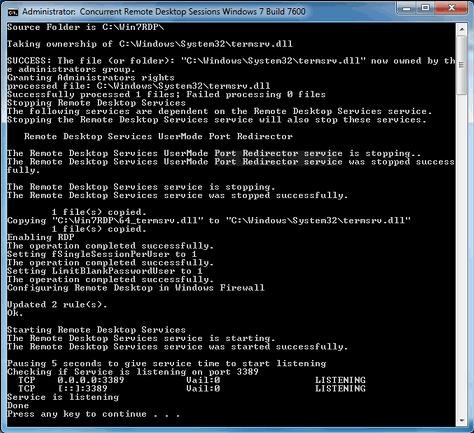
That’s it.



39 thoughts on “How to Enable Concurrent Sessions for Remote Desktop in Windows 7 RTM”
I have tried this on W7 Ultimate RTM (both 32bit and 64bit) and neither allows me concurrent sessions in the same user name. As I understand it, that is the exact purpose of this ‘hack’, right?
John, by default, install.cmd allows for concurrent sessions of different users, not the same. There are 2 command line parameters though. The following would allow for concurrent sessions using the same user:
install.cmd multi
Type “install.cmd help” to see all the parameters.
cant get the multi user working on the same log-in when using the multi param…
Worked perfect! Thanks a lot!
Works.
In order to use the same user twice set fSingleSessionPerUser in /HKLM/SYSTEM/CurrentControlSet/Control/Microsoft/Terminal Server to 0.
That’s what “multi” does, Stefan. Dan, did you manage to make it work?
Do you guys know if this will work on WIN7 (Ultimate Home)with Media Center that has a Media Center Extender connected to it?
The Extender operates with a kind of remote desktop user, and when I had XP running I tried a similar script (for XP) that messed up my registry so the extender couldn’t connect anymore. Only a fresh OS install cleared that.
Should work, Phil. The fix works by altering a dll and registry keys so the remote desktop server allows/disallows those scenarios, indifferent to the client.
Does anyone know if it works with Windows 7 Final/GA versions (which are sold)?
Should work, Fugger, since the version being sold is the RTM one (Ready To Manufacture).
Diego,
Thanks. Will try. Is there any way to revert if it messes things up? (reg. backup and?)
It’s not working.
@Diego: Not really, but that’s another topic.
@Phil: Set a system recovery point before you’ll try it.
@ABCD: Thanks!
Hello. I am having difficulty with this. I get the message that it will kick the person at the console off after running the cmd file with no options. I am remoting in as a different user than is logged in at the console.
I had done an upgrade from beta 7100 to 7600 (RTM) (I had lots of stuff installed, I’m lazy, etc). I had enabled this previously on build 7100 with success.
I have since ensured the copy of the termsrv.dll in system32 is the same as the one in the zip file. I am also looking at the registry entries. fDenyTSConnections is DWord 32-bit and set to 0. fSingleSessionPerUser is also DWord 32-bit and set to 1.
Has anyone else had difficulty getting this to work when you did an upgrade rather than a clean install of RTM? Any help is appreciated. Thank you.
Hello, just a quick note to point to a solution I posted at http://thegreenbutton.com/forums/p/79427/410442.aspx#410442 to fix the install.cmd script for Windows 7 French version (service name to stop/start and ‘administrators’ to change to ‘administrateurs’. I could have posted here but I followed the French thread at the other site… cheers.
Hi there!
Tryed it, but it’s not working. I now get a “Access denied”, when I connect…..uhhhhh help? :-P Strange that some people get it to work, so….can they please help?
Thx!
Ok, done a clean install of Win 7, then did the install -multi again. The file was patched, but the singlesession was stil set to 1. After changing that one to 0 and the second reboot, it works!
So, THX!! I’m very very happy with it! :-D
Thanks. This worked for me.
I already had the hack for my Vista HP system but it stopped working when I upgraded to W7.
I tried a hack patch but the version of termsrv.dll was the Vista one and hence the patch was no good.
This one comes with a patched W7 dll, just what I needed.
It could not start the service during the script but came good on a restart.
Thanks again for making this available.
Works fine. Please modify batch for language independent use:
…
ECHO Granting Administrators rights
ICACLS %SystemRoot%System32termsrv.dll /Grant *S-1-5-32-544:F
…
ECHO Stopping Remote Desktop Services
NET stop TermService /y
…
ECHO Starting Remote Desktop Services
NET START TermService
Thanks a lot!!
I tried on W7 ultimate and was successful.
thanks dude
Very Very Nice!!! Thanks
Great – handy stuff, thanks.
hey quick question, is there a way to remote desktop into lets say my server while someone was using it WITHOUT interrupting them?
Download Concurrent Sessions enabler file is corrupted or something like that. Can’t open it with WinZip
Very nice, thanks!
Same thing happened to me. However if I downloaded on Mac and transfered to Windows, it worked fine.
install a VNC server (tightvnc for example), use VNC client to remotely control the existing session
this works grat.. but i have one problem … i can’t connect via internet only on my local network … if anyone know’s how to fix i whould be glad to know :)
Thx
To enable multiple sessions per user run -> install multi
Installing Windows 7 sp1 disabled the concurrent sessions.
It works! excellent :)
WIN 7 Build 7601
h t t p : / / w w w. mediafire .com/?ubttrlqavne9f3a
APROVED
it was not working for me
output goes like this
—–
SUCCESS: The file (or folder): “C:WindowsSystem32termsrv.dll” now owned by the administrators group.
Granting Administrators rights
Administrators : No mapping between account names and security IDs was done
Successfully processed 0 files; Failed processing 1 files
Stopping Remote Desktop Services
The following services are dependent on the Remote Desktop Services service.
Stopping the Remote Desktop Services service will also stop these services.
—–
what is the error ..can any one help me
sathish
Running W7 and SP1 installed yesterday and replaced termsrv.dll. I pulled this file, unzipped and edited install.cmd to not check any version information and it’s working great.
whats up with windows 8
THANK YOU VERY MUCH MY FRIEND THIS COMMENT HELPED ME.
i want to download the file but the page dosen’t open .
if u have a file please upload it for me .
thank you .
The download link is broken! Anybody have the code?