
We had covered about Firefox Quantum, the next iteration of the browser from Mozilla which is 2X faster than its predecessor and giving a tuff competition to Google Chrome. Firefox Quantum,  not just have speed improvements but also comes with new Photon UI with clean and clutter-free. Mozilla team has not just worked on improving the speed of page load time, but they also managed to get the private browsing really fast which is often overlooked by other web browser makers.
In a comparison to Chrome Private browsing, Firefox Quantum is miles ahead. Despite positive reports on Firefox Quantum and everyone embracing the new Firefox with open arms, plenty of users didn’t like Firefox Quantum and would like to Uninstall it. If you are one such user and then below guide is for you.
How to Uninstall Firefox Quantum
Even though you have complete control on Firefox browser update, but if you have setup Firefox to auto-update (recommended), you may be surprised to find all sudden new look of Firefox only to realize later that it has been updated to newest version and you are not liking it at all.
Fortunately uninstalling Firefox Quantum is a piece of cake,
On Windows 8, 8.1 and Windows 10.
1. Press shortcut key Win + I, this will popup the setting charm menu.
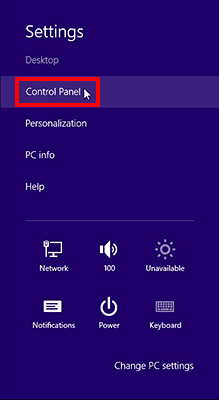
2. Click on Control Panel
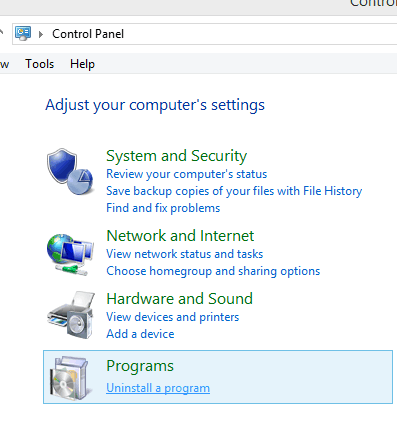
3. Locate and click on “Uninstall a program” under programs section of Computer’s setting.
4. Now locate Mozilla Firefox 57.0 depending on your installation it could show different build number.
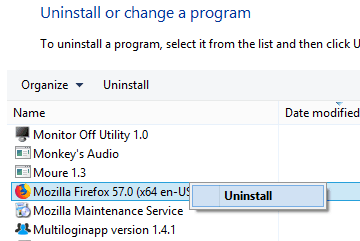
5. Right on and click on Uninstall.
Let the uninstallation complete. It would be wise to reboot your system for changes to take effect.
Manually Uninstall Firefox Quantum
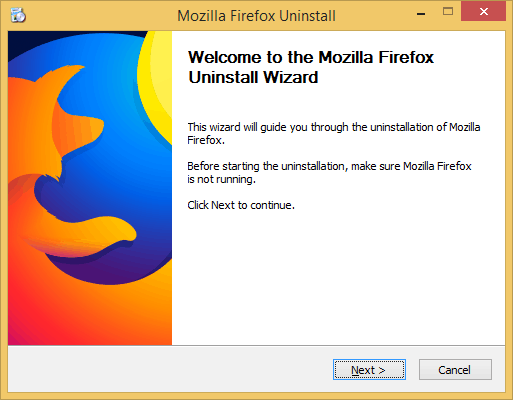
If for some reason uninstallation wizard doesn’t run for you. Then you can manually invoke helper.exe file from Firefox installation folder and complete the uninstallation process.
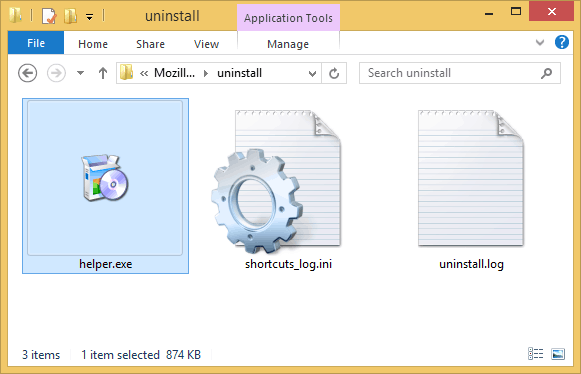
Firefox uninstaller helper.exe is located in the following directory.
C:\Program Files\Mozilla Firefox\uninstall\helper.exe
C:\Program Files (x86)\Mozilla Firefox\uninstall\helper.exe
How to Download & Reinstall Old Firefox Version
Once you have successfully uninstalled and removed Firefox Quantum, you can now proceed by installing an older version of Firefox i.e. Firefox 52.
There are many places from where you can download the previous version of Firefox; we have added a couple of sources for you.
Download Firefox 56.0.2 32-bit (English).
Download Firefox 56.0.2 64-bit (English).
Download Old Version of Firefox from FileHippo.
However, we would advise against installing a general older version of Firefox and instead opt for the Firefox ESR version which is Extended support release. Firefox ERS version would keep you safe from all the future vulnerabilities and critical issues. You can download an older version of Firefox ERS using the following link.
Download Firefox Extended Support Release.
The Firefox 52 ESR will be supported until May 2018, which is pretty good time for you to decide to switch to the latest version of Firefox or move on to totally different browser altogether.
P.S before attempting to uninstall Firefox Quantum, do make sure to backup your Firefox profile if you want to reuse all your customizations, add-ons bookmarks etc.



2 thoughts on “How to Uninstall Firefox Quantum & Reinstall Old Version”
i tried removing quantum and installed firefox previous version, as u had mentioned.But then I opened my firefox browser ,it still shows up as “firefox quantum”.please help me out
I have the same problem as PRIYA. How do I get rid of Quantum??? I hate it because my most useful plug-ins and extensions will not work with it.