
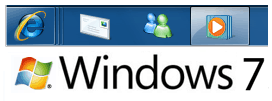
By now everyone knows about Windows 7 taskbar aka superbar which shows application & program icons instead of name. Whenever you start any application or program, icons are added to left of the windows 7 taskbar next to start Orb.
If you wish to have taskbar icons at the center of Windows 7 taskbar to have dock like look then here is tutorial on how to do it from thewindowsclub.
How to Center Taskbar Icons in Windows 7
1. Create one empty folder on desktop or in my documents folder (name is as NTB)
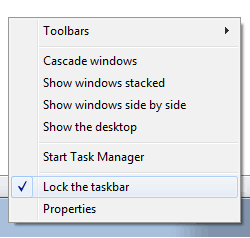
2. If you have locked your taskbar then unlock it by right clicking on taskbar and selecting “lock the taskbar”
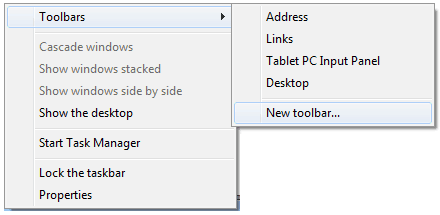
3. Right click on taskbar & select new toolbar option from toolbar sub-menu & select empty folder NTB created in step 1.
4. Now right click on the new toolbar and uncheck Show Text and Show Title.
5. Next drag it (dotted seperator) to the left side, between the start orb and taskbar icons and release it.
6. Center align the taskbar icons by dragging dotted separator present near taskbar icon and start orb towards right of new toolbar separator & Lock the taskbar.




12 thoughts on “How to Center Taskbar Icons in Windows 7”
Men
AWESOME tip…
thx a lot, just turned my life even easier…
Killer. By chance do you know how I could access my external hardrive connected to my XP machine so that I may use it as my backup device?
Thanks again!!!
dont hide the name of new taskbar, just name the folder by your name or nick, whatever at the first place. That seems cool imho.
When I first got my laptop with Windows 7, I had an area across the top in the middle that contained the most used icons in it. It contained large icons and easy to access. My harddrive crashed and when my stuff was reinstalled, that feature is no longer there. No one seems to know what I’m talking about and I’ve tried every personalization to find it – can you help?!
It was likely a third party dock that laptop manufacturers shovel in.
Create one empty folder on desktop, right click on the new toolbar, drag it (dotted seperator) to the left side, center align the taskbar icons by dragging dotted separator.
THANK YOU SO MUCH MAN. THIS IS VERY COOL. REALLY APPRECIATE YOUR HELP. ROCK ON!
when i right-clicked the new taskber it brought me to my document..can someone tell me where did i go wrong?tnx!
Awesome! THX :D so easy ^^
That was simple and efficient. Thanks a million!
Won’t work for me. NTB shows up on the right not left