
For many writers and bloggers most of their time goes in working with Microsoft Office Word like tools. What if you can have Google Search & Wikipedia like powerful service integration within Office world itself, do you think it will increase your productivity and save your time in researching for articles. If you answer is yes then we are here with excellent Microsoft Office Word 2010 add-in for writers.
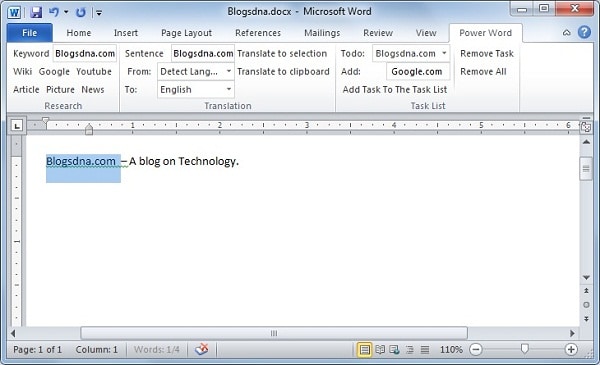
Power Word is Microsoft Office 2010 Word add-in which adds options to Office 2010 ribbon for the easy access to scientific article search, Google, News, Image, Youtube Video and Wikipedia search. It also has a todo list manager and it can translate text into 32 different languages using Bing translation service.
Power Word Add-in for Microsoft Office 2010 Word in Action
You will need to install Office runtime support for .Net Framework 4.0, which you can download using below link.



1 thought on “Microsoft Office Word 2010 Power Word Add-in for Writers”
It sounds very good …
I will surely try it once I get a computer powerful enough to run office 2010 reliably… But .. currently I am on office 2003.
Does anyone know about some add-in like this which could be used with office 2003???