
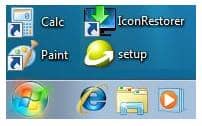
A well organized Windows desktop with logical icons arrangement on desktop can increase productivity. Many a time we start with well organized desktop icons but once we start working our desktop become mess of icons and no one wants to spend time in reorganizing desktop icons.
One possible solution to this is saving desktop icons postion and restoring back when you feel desktop has become cluttered. Here is small freeware utility IconRestorer which enables you to Backup & restore icons position on desktop (and wallpaper) separately for every screen resolution.
Features of IconRestorer
1. Windows Vista, Windows 7 compatible.
2. Works on 64-bit systems (XP, 2003, Vista, 2008 and Windows 7)
3. Manage icons position separately for all screen resolutions
4. Multiple backups for each resolution
5. Backup management: rename, delete, export and import
6. Backup Preview (thumbnails of saved backups):
7. Option to Save and Restore the Desktop Wallpaper with icons positions
Screenshot of IconRestorer
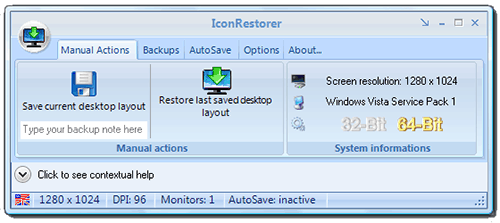
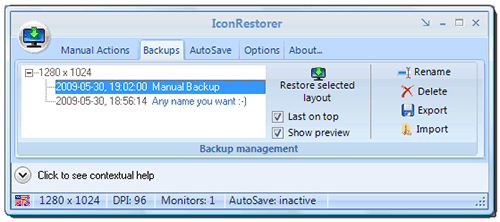
Download IconRestorer to Backup & Restore Desktop Icons Position.



4 thoughts on “Backup & Restore Desktop Icons Position on Windows 7, Vista & XP”
Hey thanks a lot for this one mate.
I have downloaded and tried a few icon sae/restore utils lately – since I started messing with Windows 7. some of them just refuse to work on win 7 but others look like they are working but then, when you test the restore function the icons go to the wrong places!
So I am really hopeful for this one as you say it works with Windows 7 so can’t wait to try it.
I use my TV connected to the graphics card and watch a lot of stuff that way..which also involves changing the resolution when changing which monitor to view on. and this always causes icons to go all over the place afterwards!
Cheers, bookmarking your site too, useful!
i am nagaraj, bangalore
i have problem, that is
all icon are hidden on desktop, how to restore on desktop
This is the only icon save/restore program that works for me.
However, it doesn’t handle my wallpaper correctly. I’m using Windows 7 (SP1) and I have the Desktop Background set to do a Slide Show. When I restored the icons using this program (after saving them, of course), the background was black until I refreshed it, and then I only had a single background image and not the slide show. I had to go back and select the folder in which I had stored the slide show images, and then the slide show mode was turned back on.
A super programme, that has helped me today! Thank you. E-mail sent.