iPhone is one of the best devices to work with location enabled apps. It’s does very cool things with this location-enabled services. Having enabled this service, The users will be able to find coffee shops, hotels or whatever locations nearby them. They can set reminders to do when they reach the boundary of that location. This lets the users to get the suggestions around them.
Apple and Lots of third-party apps are using location services. It uses GPS, Crowd-Sourced WiFi and Cell phone towers to determine the locations. As it has got pros, It does have cons. Yes. It drains the battery power. It uses the aforementioned technologies to determine the locations and it causes the battery drain issue. Some of the apps are real necessary to have like Google Maps while travelling whereas some of them are really not such social media, etc.
This triggers the users to think about turning off this service. The users can turn off this service completely or can be allowed only for chosen apps. Follow the instructions to do so.
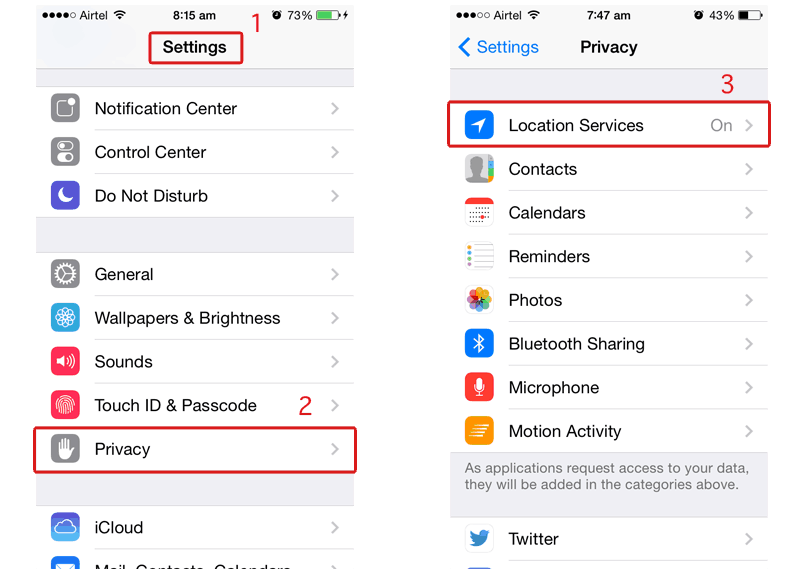
Step 1:
Go to “Settings”
Step 2:
Tap on “Privacy”
Step 3:
Choose “Location Services”
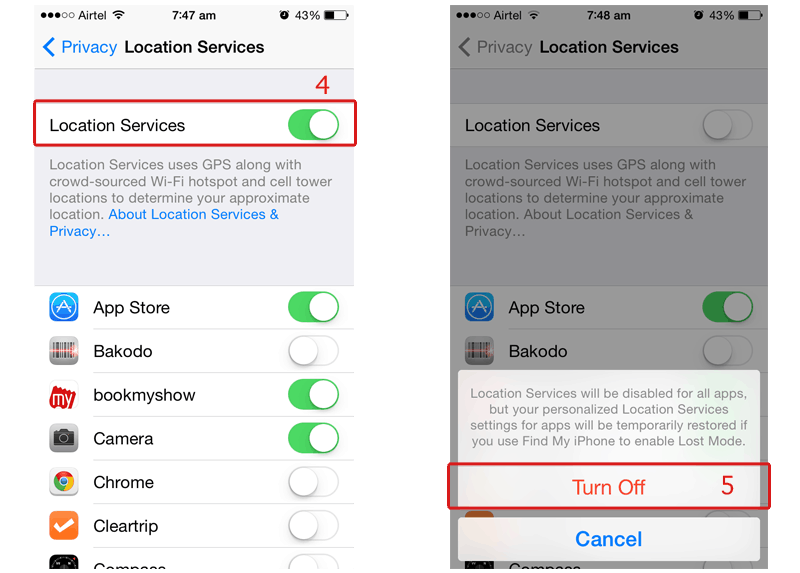
Step 4:
Here you can see a list which has apps names listed with the toggle button to turn it off / on. It can be turned off individually or turned off totally. The button which is next to “Location Services” will turn off / on this service.
Step 5:
Tap on “Turn Off” to stop the service. The service will be temporarily restored when you enable Find My iPhone Lost Mode